Private Kubernetes Access with Tailscale
Tailscale turns private Kubernetes access from a network headache into a one-command solution.
First published on Medium
AI-Generated Banner
Introduction
Kubernetes has been one of the hottest tools on the market, which a DevOps Engineer works on daily. It is powerful and convenient on the good side, but it means risks on the bad side. Access control to Kubernetes clusters has been a challenging and unstoppable topic nowadays. Doing it incorrectly is basically handing it out to the bad guys.
There have been solutions like VPNs, SSH tunnels, or complex network rules. They all work, but could be fragile, hard to maintain, or lack scalability. We need a simple and zero-trust way to reach our clusters privately.
So, I think of Tailscale… it could be the perfect solution! In this article, I will go through the setup with you so that you can access your Kubernetes cluster privately using Tailscale.
What Is Tailscale
Tailscale · Best VPN Service for Secure NetworksSecurely connect to anything on the internet with Tailscale. Deploy a WireGuard®-based VPN to achieve point-to-point… tailscale.comAccording to their website,
Tailscale is a mesh VPN (Virtual Private Network) service that streamlines connecting devices and services securely across different networks. It enables encrypted point-to-point connections using the open source WireGuard protocol, which means only devices on your private network can communicate with each other.
Easier to understand, Tailscale
- Built on WireGuard, identity-based
- Work across devices
- No need to expose ports or open inbound firewall
Compared to traditional ways to privatise your clusters, they offer a simpler way that creates a private mesh network between devices and servers, so that your cluster’s API are reachable from anywhere.
You may say, the traffic within this mesh network is still going through the Internet. You are not wrong. The traffic or the packets are end-to-end encrypted with the private key only stores in the servers or devices. You can say it’s not physically isolated, but it’s still a private network in a different way.
Architecture Overview
To set up the private access, Tailscale Operator runs inside the Kubernetes cluster as a Pod. It connects the cluster’s internal network to your Tailnet, which is a private space belongs to your interconnected users, devices, and resources. Once connected, your machine can access the Kubernetes API as if it were on the same LAN.
The architecture can be broken down into four components:
- Your device running Tailscale, like a laptop
- Tailscale network, or Tailnet, that connected all authenticated nodes
- Kubernetes cluster nodes, that runs Tailscale Operator to join the Tailnet
- Kubernetes API server, that remains internal
Here is the simple flow to showcase the process,
- You authenticate your local device with Tailscale
- The Kubernetes nodes runs authenticated Tailscale operator as a Pod
- Both appear as peers on the same Tailnet network
- Using
kubectlto connect to Kubernetes API server
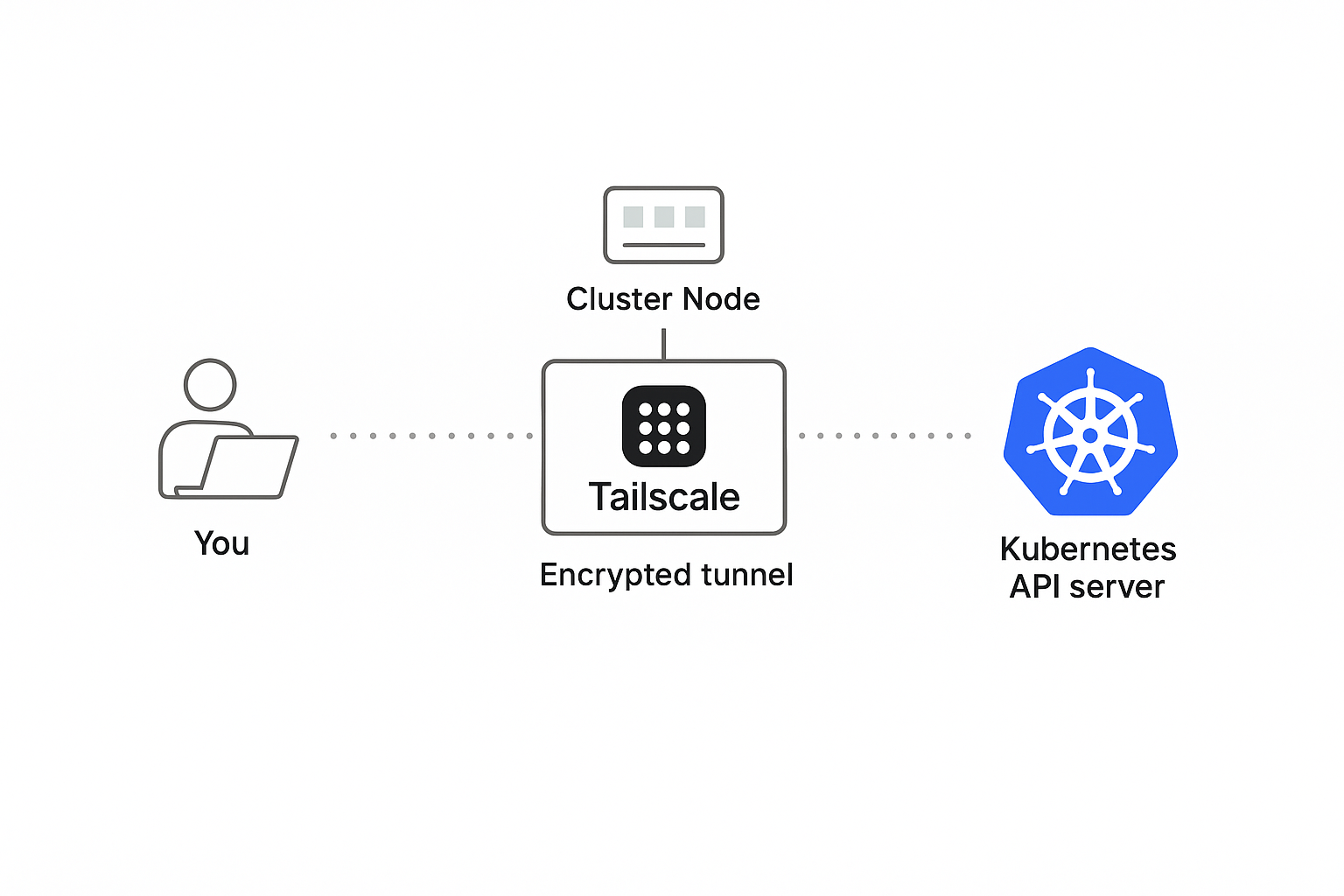
Network Flow Diagram
As a zero-trust solution, no public IPs or open ports required. The access control is totally based on device identity and ACLs which configures through the Tailscale console. And most important is, all the communications are authenticated and encrypted.
Prerequisites
Before you start the configuration, please make sure the following prerequisites are fulfilled.
- A running Kubernetes cluster
- Local machine with Tailscale CLI,
kubectl, and Helm installed - Tailscale account with HTTPS enabled in your Tailnet
Tailscale Setup and Cluster Access
Tailscale Operator
To connect the Kubernetes cluster to your Tailnet, we will need to use the Tailscale Operator. What it capable is not limited to enable the private cluster access, you can check their page for the full capabilities.
Kubernetes operator · Tailscale DocsLearn how to expose your Kubernetes cluster to your Tailscale network. tailscale.comBefore we deploy the operator on the cluster, we need to pre-configure the access control and create OAuth client credentials so that the operator can authenticate to the Tailnet.
On the Tailscale console, you should see a Access controls tab, and a option to use JSON editor.
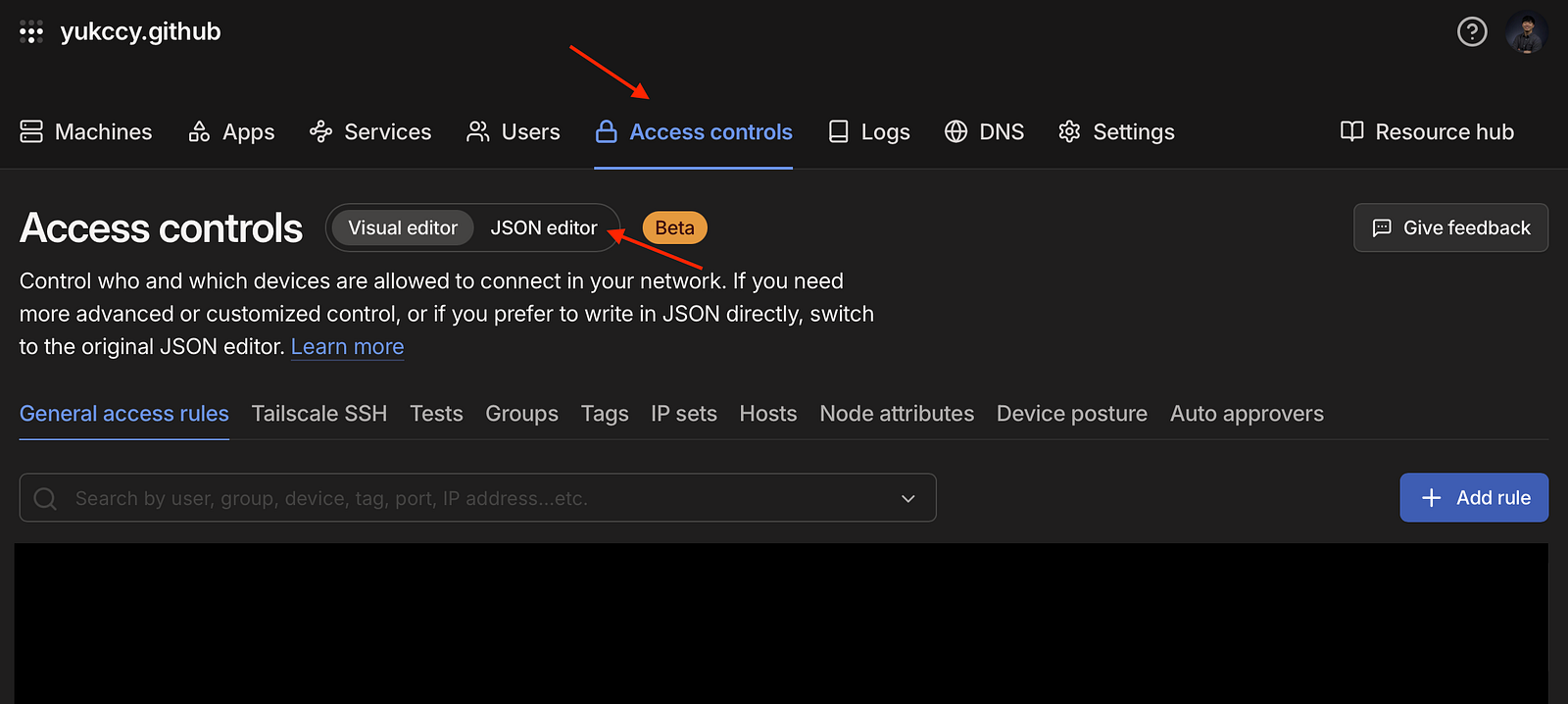
Access controls page on Tailscale console
Make sure you add the tags here, and allow them to connect. The following is configs have been tested working for demo purposes.
"tagOwners": {
  "tag:k8s-operator": [],
  "tag:k8s":          ["tag:k8s-operator"],
 },
"grants": [
  // Allow all connections for demo purposes
  // You can restrict it with specific settings here
  {
   "src": ["*"],
   "dst": ["*"],
   "ip":  ["*"],
  }
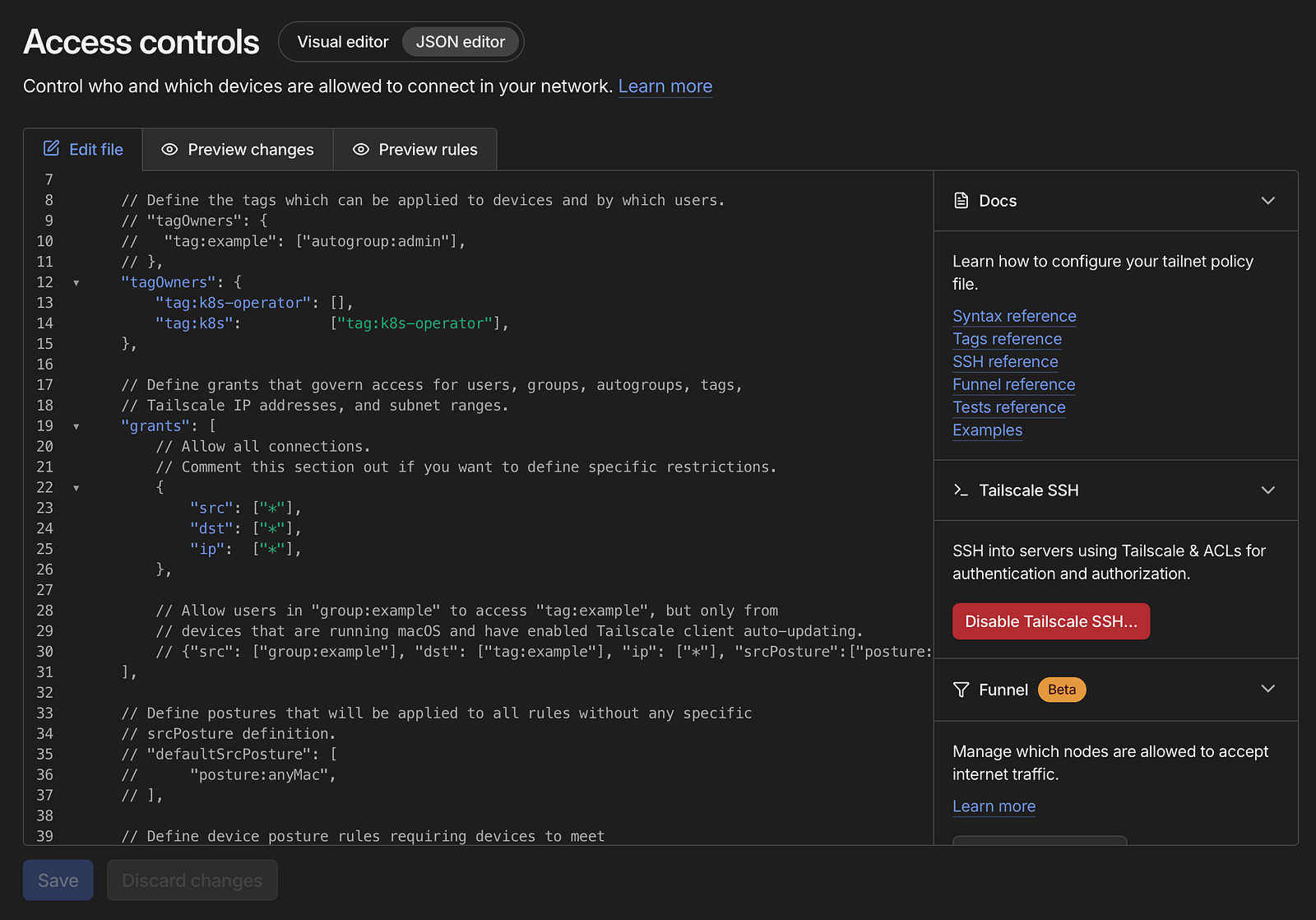
Access controls example
Then, go to the settings page, and choose OAuth clients on the side menu to create a new OAuth client with Devices Core and Auth Keys write scopes, and the tag you add in the access controls page.
Don’t forget to keep the clientId and clientSecret, we will need them in the deployment.
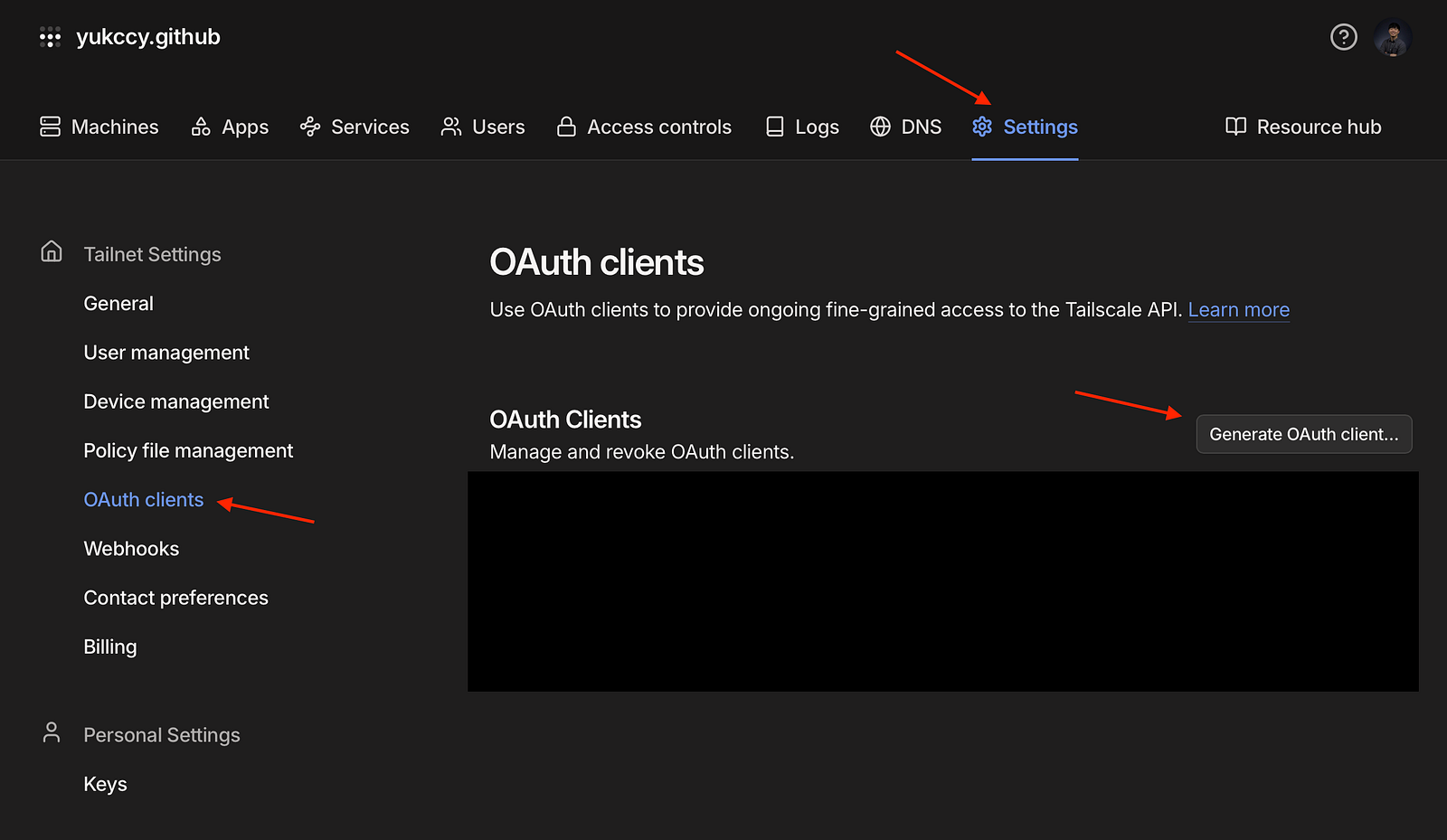
Create OAuth clients
Now we are ready to deploy the Operator. Tailscale provides a Helm Chart for the deployment.
First, add the Helm repository.
helm repo add tailscale https://pkgs.tailscale.com/helmcharts
helm repo update
Then, install the Helm Chart.
helm upgrade \
  --install \
  tailscale-operator \
  tailscale/tailscale-operator \
  --namespace=tailscale \
  --create-namespace \
  --set-string oauth.clientId="<OAauth client ID>" \
  --set-string oauth.clientSecret="<OAuth client secret>" \
  --set-string apiServerProxyConfig.mode="true" \
  --wait
Finally, verify if the pods are running.
kubectl get pods -n tailscale
You should also see the operator has been connected to the Tailnet.
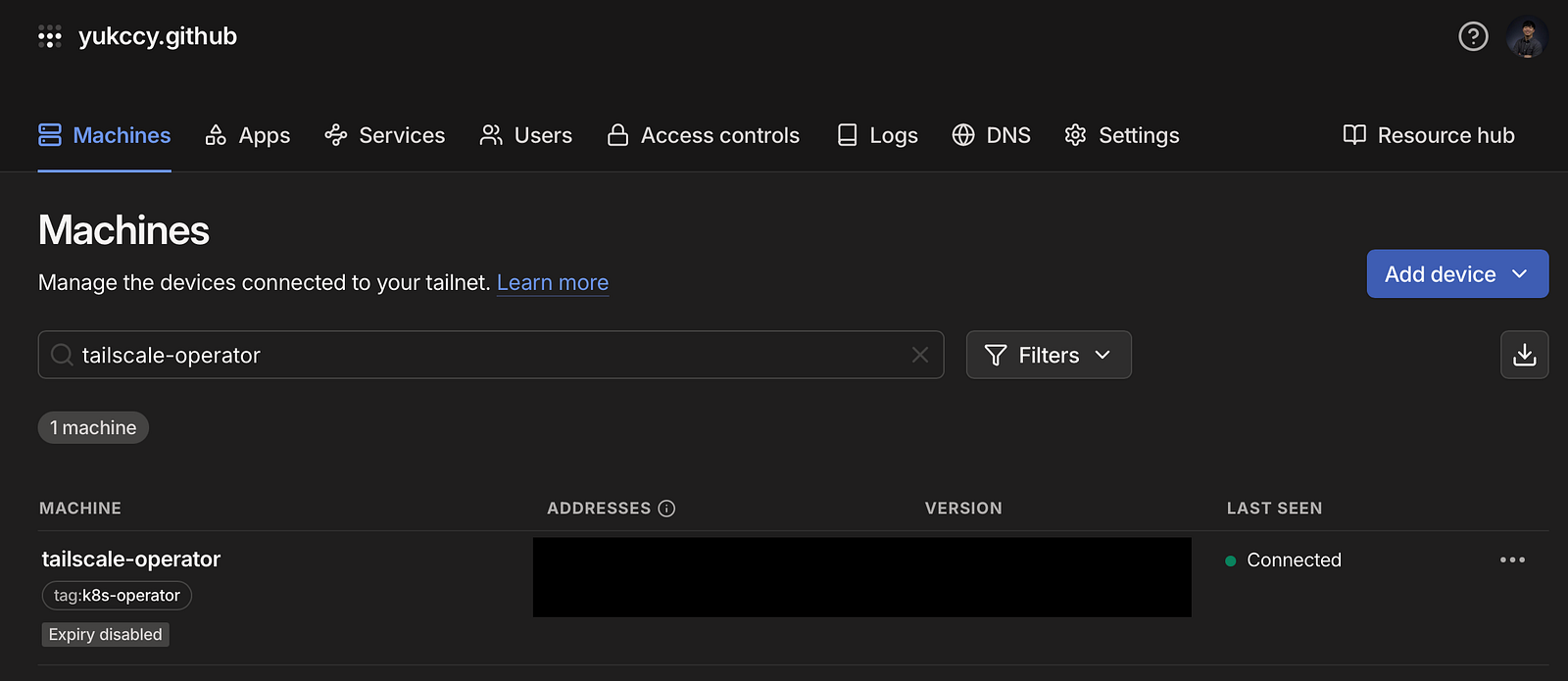
Tailnet-connected machines
Cluster Access
Right now your cluster has been connected to the Tailnet through the operator. Before we can use the API server, we need a clusterrolebinding that binds to your Tailscale user.
#You should adust the cluster role based on your needs.
#I use `cluster-admin` for demo purposes.
kubectl create clusterrolebinding <Your Preferred Binding Name> \ ✔ │ took 19m 19s │ at tailscale-operator.tailb0b12.ts.net ⎈ │ at 00:39:38
--clusterrole=cluster-admin \
--user="<Tailscale Username>"
Run the Tailscale CLI to configure kubectl for you.
tailscale configure kubeconfig tailscale-operator
There will be a new context in your local Kube config. Check the current context and test it out!
kubectl config get-contexts
kubectl config current-context
End
You’ve just built a private, identity-based connection to your Kubernetes cluster without opening a single public port. Using Tailscale, your kubectl commands now securely tunnel through a WireGuard-based mesh network that’s only accessible to authenticated devices.
This approach removes the need for static VPNs, jump hosts, or exposed API endpoints. Every connection is encrypted end-to-end, tied to real user identities, and auditable through Tailscale’s admin console. It’s simple to set up, easy to maintain, and scales from a single developer to an entire team.
From here, you can take it further like integrating ACLs to manage fine-grained access, using Tailscale SSH for node management, or deploying the setup across multiple clusters. You can even automate everything with Terraform or GitOps workflows.